Quick Answer
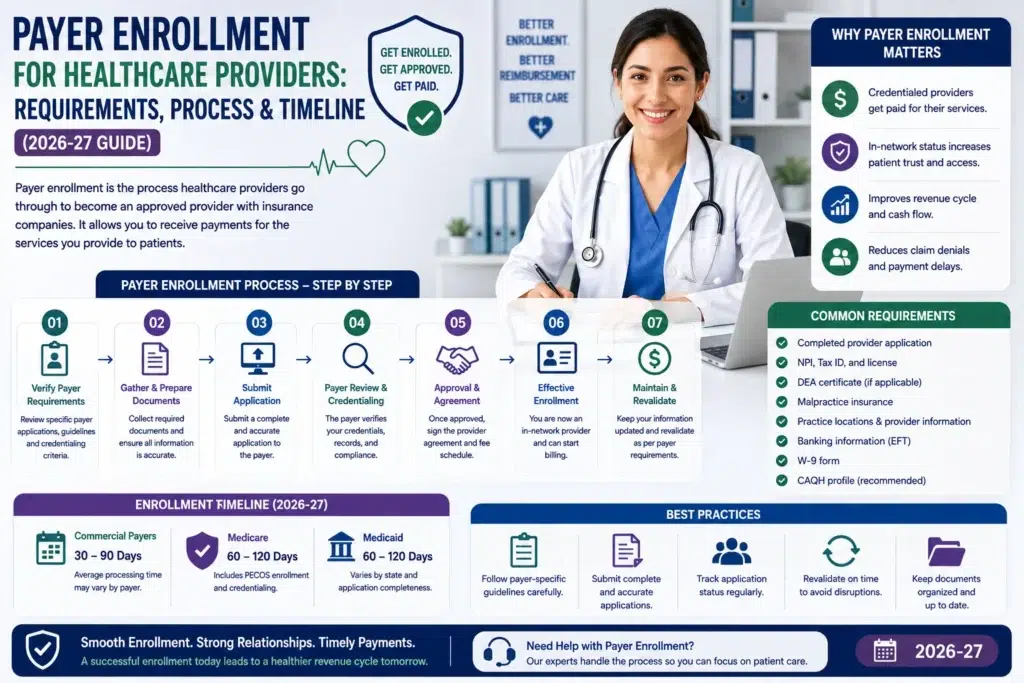
Payer enrollment is the process healthcare providers complete with each insurance company, such as Medicare, Medicaid, and private insurance plans. It allows providers to bill the payer and receive in-network payments. The process can take more than 150 days if applications are incomplete, CAQH information does not match, or required documents are missing. Providers can speed up the process by starting enrollment early, keeping their CAQH profile updated, and using a checklist for each payer’s requirements.
What Is Payer Enrollment?
Payer enrollment is the process healthcare providers complete with an insurance company, such as Medicare, Medicaid, Aetna, Cigna, or Blue Cross Blue Shield. It allows doctors, medical practices and healthcare facilities to submit claims and get paid for treating the insurance company’s members.
In simple terms, payer enrollment answers one main question: Can this provider bill us and where should we send the payment?
During enrollment, the payer collects important information such as the provider’s NPI, Tax ID, practice locations, and billing details. Once approved, the provider is listed as in-network with agreed-upon payment rates or, in some cases, approved to bill as an out-of-network provider.
Importance of Payer Enrollment:
Payer enrollment is important because providers generally cannot bill an insurance company until they are properly enrolled. If a provider treats a patient before enrollment is complete, the claim can not be paid, leaving the provider to collect payment directly from the patient when allowed.
Payer Enrollment vs. Credentialing vs. Contracting
These three terms are often used to mean the same thing, but they are actually different steps in the process. Let’s clear up this confusion and delays when handling the process in-house.
Stage | Question It Answers | What’s Reviewed | Typical Owner |
Credentialing | Is this provider qualified and safe to practice? | Education, licensure, board certification, work history, malpractice history, sanctions/exclusions | Payer’s credentialing committee, using CAQH or a delegated entity |
Payer Enrollment | Can this provider bill us, and where does payment go? | NPI, TIN, practice locations, banking/EFT details, group affiliation, specialty taxonomy | Payer’s provider enrollment/network operations team |
Contracting | On what terms will we pay this provider? | Fee schedule, reimbursement rates, participation agreement terms, effective date | Payer’s network contracting team |
Credentialing usually needs to be mostly completed before payer enrollment can move forward. With commercial insurance companies, contracting is usually completed around the same time as enrollment or shortly after approval.
Medicare works a little differently. There is no separate contracting process like there is with commercial payers. Medicare enrollment through PECOS establishes the provider’s billing privileges and payment rates are based on the Medicare Physician Fee Schedule rather than negotiated rates.
A provider can be fully credentialed but still unable to bill an insurance payer because enrollment is not complete. This is one of the most common reasons practices contact payers when a new provider has started working but payments have not yet been received.
Why Payer Enrollment Matters for Your Revenue
Enrollment delays are not just a paperwork problem. They can directly affect a practice’s cash flow and revenue.
- Unbillable visits: If a provider sees a patient before their insurance enrollment is approved, the insurance company may not pay for that visit. In some cases, Medicare may allow the provider to bill for earlier services.
- Claim denials and extra work: Claims submitted before a provider is properly enrolled, or when the NPI and Tax ID do not match the payer’s records, can be denied. Fixing and resubmitting these claims can delay payment even further.
- Referral and ordering issues: Medicare can deny claims from labs, imaging centers, or home health agencies when the ordering or referring provider is not properly enrolled in PECOS. This means one provider’s enrollment problem can affect other providers too.
- Directory and network issues: If enrollment is incomplete, the provider does not appear correctly in the insurance company’s provider directory. This can reduce referrals and create additional compliance concerns.
- New-hire and expansion delays: When practices hire new providers or open new locations, starting enrollment late can mean weeks of lost billing opportunities. Payer enrollment can take time, even when a provider’s start date is approaching.
Who Needs Payer Enrollment
Payer enrollment applies to many types of healthcare providers and organizations, including:
- Doctors (MDs and DOs) in all specialties
- Nurse practitioners, physician assistants, and other advanced practice providers
- Behavioral health providers, such as therapists, social workers, psychologists, and psychiatrists
- Dentists, optometrists, audiologists, chiropractors, and podiatrists
- Physical, occupational, and speech therapists
- Group practices, clinics, and multi-specialty practices, which need to enroll both the organization and each individual provider
- Other healthcare providers, including laboratories, imaging centers, home health and hospice agencies, and DMEPOS suppliers
- Telehealth providers, who need to enroll in each state where their patients are located
Enrollment is also required when a solo provider starts a practice, a practice hires a new provider, expands to another state, or a provider starts working under a new Tax ID (TIN).
Payer Enrollment Requirements: Document Checklist
Payer requirements vary but most enrollment applications need the same basic documents. Having them ready before you apply can help avoid delays.
Business & Identity
- Individual and group NPI
- Tax ID (TIN) confirmation
- Legal business name and business documents
- Voided check or bank letter for EFT
Licenses & Credentials
- Current state professional license
- DEA registration, if required
- Board certification, if applicable
- Medical school and residency documents
- Controlled substance registration, if required
Practice Information
- Work history
- Malpractice insurance certificate
- Malpractice claims history
- Practice address and hours
- Hospital privileges or coverage arrangement, if required
Payer-Specific Documents
- Updated and attested CAQH profile
- Payer enrollment application
- W-9
- Collaboration or supervision agreements, if required
- Group roster, if applicable
Any missing, expired, or incorrect documents are common reasons enrollment applications are returned and delayed.
The Role of CAQH ProView in Payer Enrollment
CAQH ProView is a centralized credentialing repository used by most U.S. commercial payers and many Medicaid managed care organizations. Instead of sending the same documents to every payer, providers can maintain one CAQH profile and give payers permission to access it.
Important Things to Know
- Update every 120 days: Providers should review and re-attest their CAQH profile at least every 120 days. Missing this can delay enrollment and credentialing.
- CAQH does not replace payer applications: Providers still need to complete each payer’s enrollment application.
- Regular re-credentialing: Most commercial payers re-credential providers about every 3 years, often using information from CAQH.
- Keep information consistent: Names, addresses, NPI numbers, licenses, and other details should match across CAQH, payer applications, and government records. Even small differences can cause delays or rejections.
The Payer Enrollment Process, Step by Step
- Individual providers need a Type 1 NPI, while groups need a Type 2 NPI.
- Add your education, licenses, work history, malpractice insurance, and practice information. Then authorize the payers you want to access it.
- Check that all licenses, insurance certificates, DEA registration, and other documents are current and accurate.
- Medicare, Medicaid, and commercial insurance companies have different enrollment forms and requirements.
- Submit applications to Medicare, Medicaid, and commercial payers at the same time when possible. This can help reduce the overall enrollment time.
- Check payer messages and portals regularly and respond quickly if they ask for additional information.
- Check your enrollment status and confirm the effective date. For commercial payers, complete the contract and fee schedule if required.
- Add the provider’s payer IDs, Medicaid number, PTAN, and other details exactly as provided by each payer.
- Set reminders for CAQH updates, Medicare revalidation, and commercial payer re-credentialing so nothing expires.
Payer Enrollment Timeline: Realistic Benchmarks by Payer Type
Payer enrollment timelines vary by insurance type.
- Medicare enrollment takes 45–65 days while Medicaid can take 90–120 days
- Medicaid managed care plans and commercial insurance companies generally take 30–120 days but it depends on the payer and provider type.
- CAQH profile approval can take approximately 90 to 120 days and this usually occurs at the same time as payer enrollment.
These timeframes are based on the application being complete and accurate. Enrollment can take 150 to 180 days or more if corrections or additional documents are needed. This is just an estimate so days can vary.
What Causes Enrollment Delays (and How to Prevent Them)
- Data mismatches: Names, addresses, NPI, or license details can differ between NPPES, CAQH, and payer records.
How to prevent it: Make sure all provider information matches before submitting. - Expired CAQH profile: The provider missed the 120-day CAQH re-attestation deadline.
How to prevent it: Set reminders before the profile needs to be updated. - Wrong application form: The wrong Medicare or Medicaid form was submitted.
How to prevent it: Check the correct form and payer portal before applying. - Incomplete work history: Employment gaps are not explained.
How to prevent it: Include a short explanation for every gap. - Missing or outdated documents: Required signatures, licenses, or malpractice documents are missing or expired.
How to prevent it: Check all documents again before submission. - Ownership or group information errors: Group ownership details are incomplete or incorrect.
How to prevent it: Confirm the group’s ownership and business information before applying. - Missed payer requests: Additional information requested by the payer is not provided on time.
How to prevent it: Assign one person to check payer messages and portals at least twice a week. - Submitting applications one by one: Waiting for one payer to approve an application before applying to another increases the overall timeline. To prevent this error, submit Medicare, Medicaid, and commercial applications at the same time whenever possible.
How M&M Claims Care Handles Payer Enrollment For You
Payer enrollment can be time-consuming and small mistakes can delay payments. M&M Claims Care provides complete payer enrollment and credentialing support for Medicare, Medicaid, and commercial insurance plans. We handle CAQH setup and updates, track applications and payer requests, and help with revalidation and re-credentialing deadlines. With years of experience across healthcare specialties, including behavioral and mental health, we make the enrollment process easier so providers can focus on their patients and keep their revenue cycle moving.